We are Reuss we are full-service Internet marketing and SEO company.

Our Gallery

contacts

92 Bowery St., New York, NY 10013, USA

reuss.seo@mail.com

+1 (800) 123 456 789

Category: Google Marketing Material

Site Cache Google: What It Is, How It Works & Why It Matters for SEO

Given the intense competition that exists in the current internet world, it is critical to learn about search engine operations in order to enhance the performance of your website. One aspect that needs to be looked into is Google’s site cache. This is significant because it determines how your site is cached, indexed, and displayed on the results page. If you are into SEO, then you should understand how the cache system works. To build a strong foundation, you can also learn more about what SEO is and how it impacts your website performance.

Here is an informative article on the Google site cache that will help you get started.

What Is Google Site Cache?

site cache google

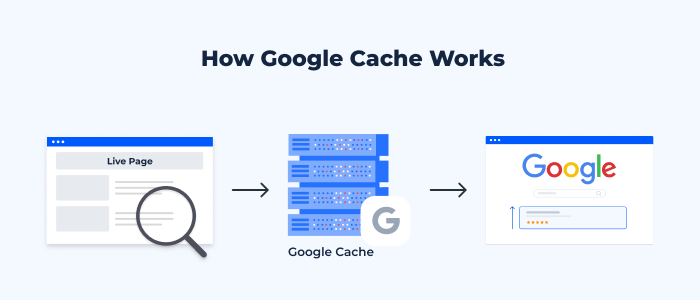
Google site cache is defined as the stored copy of a web page captured by Google during its indexing. Google captures your webpage and stores it at some point in time. This stored version of the webpage is used by Google to present your content if, for any reason, the original page cannot be accessed or if it takes too long to retrieve.

Googlebot visits and analyzes your webpage content, and it stores a cached version of the page. This process is closely related to how search engines rank websites, which you can explore in detail in this guide on Google SEO ranking. The stored version of your webpage can then be viewed by both users and SEO experts to see how Google views a certain page. Moreover, using the Google site cache, you can determine if Google has updated its records after making changes to your web pages. Google cached versions of your pages are not necessarily the latest real-time versions, since it all depends on how often Google crawls your site.

Why Google Cache Is Important for SEO

site cache google

Helps in Faster Indexing

The Google cache has an important part to play when it comes to improving the speed at which the indexing process is completed. It becomes evident that your website is cached by Google when it has been discovered and stored by Google. This also shows that the page has been indexed and is now available for display on the search engine results pages. Proper indexing plays a key role in overall SEO success, which is why many businesses invest in professional SEO services to improve visibility.

Improves Website Visibility

Cache pages will ensure that you can always access your website content, even if the live page goes down due to any technical reasons. In case your live page goes down for some time, visitors to your website can view the cache page version until such time as the problem on your site is sorted out.

Useful for Troubleshooting SEO Issues

Google’s cache facility can help you determine the SEO problems with your site. Through comparison of your cached content to the latest one on your site, you will be able to tell whether Google has noticed any updates in your site. If Google’s cache still shows old data, then there are some SEO issues. In such cases, focusing on technical SEO services can help resolve crawling and indexing problems more effectively.

Backup of Web Pages

Another advantage of Google cache, which goes unnoticed by many people, is its use as a backup tool for the site content. In case your web page gets deleted accidentally or becomes inaccessible, then you can always fall back on the cached content available in Google cache.

How Google Site Cache Works
site cache google

Crawling and Indexing Process

This process starts from Googlebot, which is the search engine bot for Google. The Googlebot goes through your website and analyzes your content. Ensuring your pages are properly optimized with the right structure and keywords is part of effective on-page SEO services and directly impacts how Google understands your content and gathers information about your webpage. While analyzing the content, the Googlebot studies a variety of factors, including text, images, hyperlinks, and meta tags. When the process is completed, the page will be indexed and stored in the Google database.

Storing Cached Versions

Once it has indexed your website, Google will take a snapshot of your webpage. It stores this snapshot in its servers and is an actual copy of the webpages as they appeared when they were crawled. Most of the web pages’ contents are stored in the snapshot, but there might be some dynamic parts that will not make it into the snapshot.

Cache Update Frequency

Factors determining the frequency of refreshing cache by Google include the extent to which your content changes frequently, the authority of your website, and the frequency of crawling. Content-rich websites that update their information often will see the cache refreshed frequently. Regular content updates through strategies like blog writing services can significantly improve crawl frequency and rankings. In contrast, those websites that are static or infrequently updated may end up having an outdated cache.

How to Check Google Cached Pages

The checking of cached pages on Google is a very straightforward activity that can give you some vital information about your site’s indexing status. It may be done through using the Google search engine or even particular search operators. Whenever you go to the cached page of your website, you can see its date and time of crawling by Google, thus understanding how fresh your indexed data is.

The checking of cached pages is essential for all SEO specialists who want to check if their site has been changed. It also helps identify issues that may affect performance, similar to insights shared in this guide on common blogging mistakes, according to their desires, and has been seen by Google.

Common Issues with Google Cache

site cache google

Cached Page Not Updating

Another problem that often occurs involves having a cached copy that is outdated since it does not contain the latest changes on the web page. This often occurs because Google has not been able to index the page once more after the changes have been made to it. This is due to infrequent crawling, technical problems, or poor internal linking of the pages.

Missing Cached Version

At times, there might be no cache available at all on the web page. This is possible due to various reasons, such as the recent creation of the page or restrictions. Weak backlink signals can also delay indexing, which is why understanding the importance of backlinks is crucial. Having restrictions in place against crawling, the use of certain meta tags that block caching, or perhaps because the page has not been indexed by Google yet.

Outdated Cached Content

The cached information being outdated might mislead visitors and negatively impact SEO. If there are major differences between the cached copy and the live website, it could be an indication that the page was not crawled by Google lately. Refreshing your content will make Google crawl the site again.

Google Cache vs Browser Cache: What’s the Difference?
site cache google

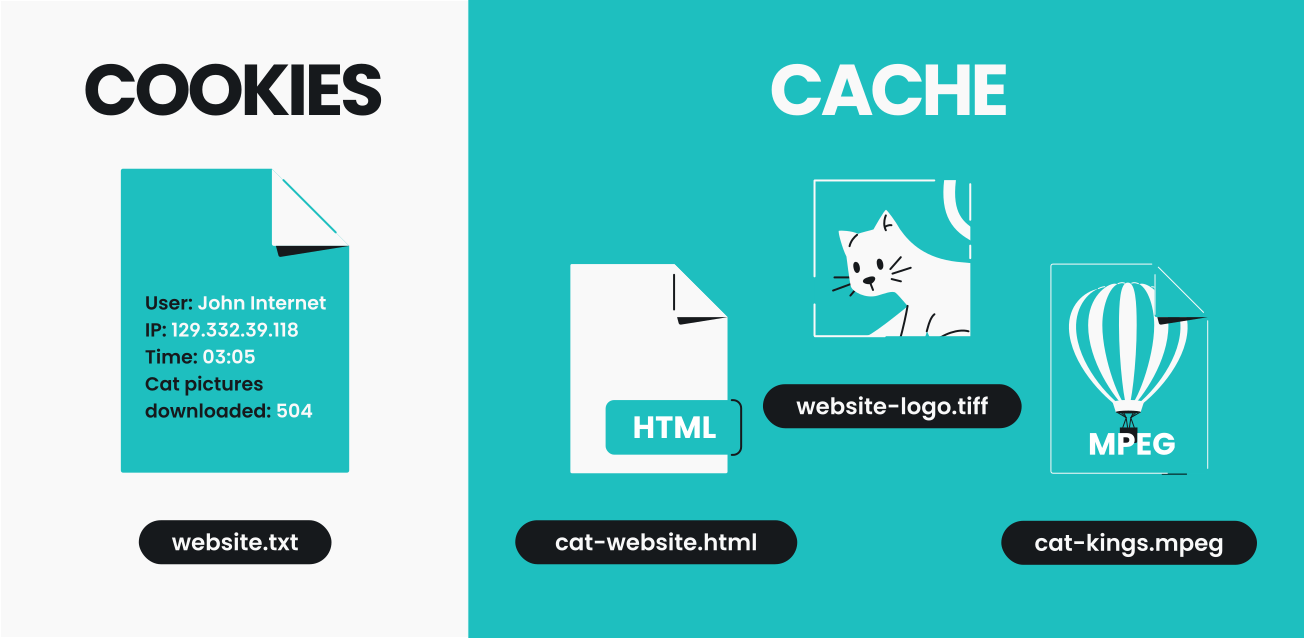
The main difference between Google Cache and Browser Cache lies in their functions, even though both systems deal with keeping copies of web pages. Google creates Google Cache and deals with taking snapshots of your webpages to facilitate the indexing of the latter. The cache is available from the search results, and it shows what Google thinks about your page.

Browser Cache, unlike Google Cache, is created locally on the user’s computer. It is used to save all information loaded during the previous visit to your web page, including images, scripts, and stylesheets. By caching your web page, Google helps you load it faster when you visit it in the future.

Both Google Cache and Browser Cache are important for search engine optimization of your web page.
What Is Performance Marketing? A Complete Guide for Businesses

In today’s competitive digital environment, businesses are constantly looking for marketing strategies that deliver measurable results. Traditional marketing methods often make it difficult to determine whether advertising budgets are producing real outcomes. This is where performance marketing has gained significant popularity in the digital marketing industry.

Performance marketing has become an essential part of a strong digital marketing strategy for businesses looking to achieve measurable growth. Instead of spending money on campaigns without knowing the exact return, businesses only pay when a specific result is achieved.

Because of this results-driven approach, performance marketing has become a preferred strategy for companies that want to maximize their marketing budget and improve return on investment. In this guide, we will explain what performance marketing is, how it works, the channels used, and how businesses can build an effective performance marketing strategy.

What Is Performance Marketing?

what is performance marketing

Performance marketing is a digital marketing strategy in which advertisers pay marketing platforms or partners only when a specific action is completed. These actions can include clicks, leads, app installs, or product purchases.

Unlike traditional advertising models, where businesses pay for impressions or ad placements regardless of results, performance marketing focuses on paying for measurable outcomes. This makes it a highly efficient and cost-effective approach for businesses that want to track and optimize their marketing performance.

Performance marketing typically involves collaboration between advertisers, publishers, affiliate partners, and marketing platforms to drive targeted traffic and conversions.

Key Concept Behind Performance Marketing

The core concept behind performance marketing is the pay-for-results model. Instead of paying upfront for advertising space, businesses only pay when users complete a desired action.

For example, if a business runs a campaign designed to generate leads, payment is made only when someone submits their information through a form. This ensures that marketing budgets are spent on campaigns that produce real results.

How Performance Marketing Works

Performance marketing works through a structured ecosystem involving several key participants. Advertisers create campaigns to promote their products or services, while publishers or marketing platforms help distribute these campaigns to targeted audiences.

Tracking technologies such as analytics tools and conversion tracking systems measure user interactions with ads. When a user completes the desired action, such as clicking an ad or making a purchase, the advertiser pays the agreed cost.

Businesses often combine performance marketing with professional SEO services to build long-term online visibility.

Key Channels Used in Performance Marketing

what is performance marketing

Performance marketing campaigns can run across multiple digital channels. Each channel offers unique opportunities for reaching audiences and driving measurable results.

Search Engine Marketing (SEM)

Search engine marketing involves running paid advertisements on search engines. Businesses bid on keywords related to their products or services, allowing their ads to appear in search results when users search for those terms.

Many companies rely on expert Google Ads management to run high-performing search engine marketing campaigns.

Social Media Advertising

Social media platforms provide powerful advertising tools that allow businesses to target audiences based on demographics, interests, and behavior. Businesses frequently use social media marketing services to create targeted advertising campaigns that drive conversions.

Affiliate Marketing

Affiliate marketing is another important performance marketing channel. In this model, businesses partner with affiliates who promote their products or services in exchange for a commission.

Affiliates earn money only when they successfully generate conversions, making it a highly performance-driven marketing method.

Native Advertising

Native advertising involves placing ads that match the design and format of the platform where they appear. These ads blend naturally with the surrounding content, making them less disruptive to users.

Because native ads feel more organic, they often achieve higher engagement and conversion rates.

Display Advertising

Display advertising uses visual banners and graphics placed on websites or mobile apps. These ads can drive brand awareness while also encouraging users to click and visit a website.

With proper targeting and optimization, display advertising can contribute to performance marketing campaigns.

Performance Marketing vs Traditional Digital Marketing

what is performance marketing

Many businesses integrate performance marketing with search engine optimization to achieve both short-term and long-term results.

Payment Model

Traditional digital marketing often involves paying for impressions, ad placements, or fixed advertising packages. In contrast, performance marketing focuses on paying only for measurable actions.

Tracking and Analytics

Performance marketing relies heavily on advanced tracking technologies that provide detailed insights into user behavior and campaign results. Traditional marketing methods may offer limited tracking capabilities, making it harder to measure effectiveness.

Campaign Optimization

Performance marketing campaigns are continuously optimized based on real-time data. Marketers can adjust targeting, messaging, and budget allocation to improve results. Traditional marketing campaigns may not offer the same level of flexibility or performance monitoring.

How to Create a Successful Performance Marketing Strategy

what is performance marketing

Many companies choose to work with a digital marketing expert to optimize campaigns and maximize return on investment.

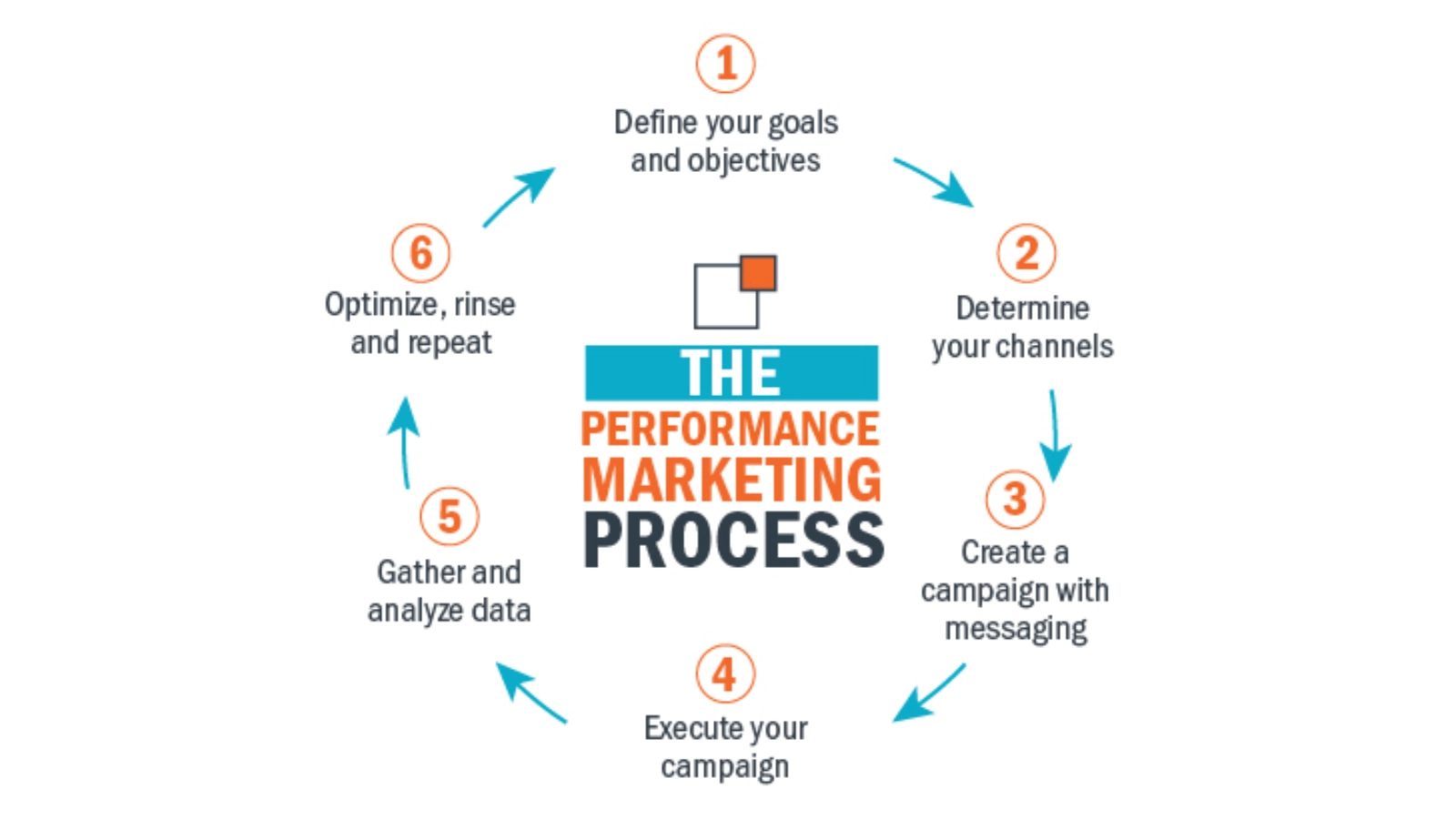
Define Clear Campaign Goals

The first step is identifying the specific goals of the campaign. These goals may include increasing website traffic, generating leads, or driving product sales.

Clear objectives help marketers measure success accurately.

Choose the Right Marketing Channels

Different channels deliver different results depending on the target audience and industry. Businesses should select platforms that align with their marketing goals and customer behavior.

Track and Measure Campaign Performance

Monitoring performance metrics allows businesses to evaluate the effectiveness of their campaigns. Tracking tools provide valuable insights into user behavior and engagement.

Continuously Optimize Campaigns

Performance marketing requires ongoing optimization. Marketers should regularly test different ad formats, targeting options, and creative strategies to improve campaign results.

Future of Performance Marketing

what is performance marketing

Performance marketing continues to evolve as technology advances. Artificial intelligence, automation, and advanced analytics are playing an increasingly important role in optimizing campaigns. Marketers are also using machine learning algorithms to analyze large datasets and predict consumer behavior more accurately. As digital marketing becomes more data-driven, performance marketing is expected to remain one of the most effective strategies for businesses seeking measurable growth.

Elevate Your Business with Professional Google Ads Management Phoenix

Maximize Your ROI with Expert Google Ads Services

The digital market of the Phoenix offers both challenges and opportunities to the residents of the Phoenix so that businesses can flourish and become successful. Google ads management phoenix is an essential tool that can fulfill the needs of businesses that are focusing on increasing their user base and attracting the target audience. In this blog, the major aspects of Google ads are discussed and how it is playing an effective role in the Phoenix market.

Understanding the Phoenix Market

The Phoenix market is characterized by its large and diverse population, with a mix of local businesses and multinational corporations. Google Ads offers a versatile platform that can be tailored to the specific needs of businesses of all sizes, helping them effectively target their marketing efforts within the Phoenix market.

Customized Campaign Strategies

To resonate with the local audience, Google Ads campaigns in Phoenix require a customized approach. Professional Google Ads management services understand the nuances of the Phoenix market, including customer behavior patterns and regional preferences. They develop targeted campaign strategies that engage with the right audience and drive conversions.

Optimizing for Maximum ROI

In the competitive Phoenix market, optimizing campaign performance is crucial for maximizing return on investment. Google Ads managers use a data-driven approach to continuously monitor and evaluate campaign metrics, identifying areas for improvement. They refine keyword selection, adjust bidding strategies, and optimize ad creatives to enhance performance and achieve desired results.

Advanced Targeting Capabilities

Google Ads offers advanced targeting capabilities that allow businesses to reach their ideal customers with precision. Professional Google Ads management services leverage these capabilities to ensure that ads are delivered to the most relevant audience, maximizing conversions and engagement. They employ demographic targeting, location-based targeting, and remarketing to ensure that ads reach the right people at the right time.

Innovation and Staying Ahead

The digital marketing landscape is constantly evolving, and Google Ads is no exception. Professional Google Ads management services stay ahead of the curve by embracing the latest technologies and best practices. They experiment with new bidding strategies, integrate cutting-edge automation tools, and adopt the latest ad formats to stay competitive and deliver optimal results for their clients.

Building Long-Term Partnerships

Google Ads management is not just about achieving short-term results; it’s about building long-term success. Professional Google Ads management services focus on delivering outcomes and fostering lasting partnerships with their clients. They align their strategies with the goals and objectives of their clients, ensuring sustained growth and mutual success.

Conclusion

For businesses looking to succeed in the dynamic Phoenix market, professional Google Ads management is essential. By partnering with an experienced Google Ads management agency, businesses can harness the power of this powerful advertising platform to generate leads, attract traffic, and achieve their marketing objectives with confidence and efficiency.

Google Ad Grants Webinar

Nonprofits how would you like to receive $10,000 a month for free Google advertising? In this case, it is not too good to be true. Currently, thousands of Nonprofits have benefited from Google Ad Grants. Below will review topics recently discussed during a Google Ads Grants webinar hosted by Catchafire. “Google Ads: Overview for Beginners.” Topics will be reviewing:

  • What is Google Ad Grants
  • Do You Need
  • Eligibility and Set-up
  • Creating Your First Campaign
  • Keyword Research
Google Ad Grants Logo

Google Ad Grants Logo.

What is Google Ad Grants?

Google Ads is formerly known as Google AdWords and Google AdWords Express. These are the advertisements. That appears when you search Google, YouTube, and other sites across the web. Businesses that buy Google Ads, are able to choose specific goals for their ads. Such as driving phone calls or website visits. Here is additional information on Google Ads. There are similarities between Google Ads and Google Ad Grants. However, there are also restrictions when using Ad Grants.

Google Ad Grants – Do You Need

First, decide if your nonprofit needs Google Ad Grants. For example, your nonprofit must have a website. Also, must have traffic goals for the application to analyze. And someone at your organization to create and manage the ads. Ad creation and maintenance are important. Without your organization will not follow guidelines in the policy compliance guide. We will discuss this guide more below. If you have a website and targeted goals. And do not have time to manage. We can help with your Ad Grants management.

Google Ad Grants – Eligibility & Set-up

Besides having a website, what else is required to be eligible for the grant? First, you must be a 501c3 nonprofit. Then review and ensure you meet all requirements. Once you have determined you are eligible. The next step, request a Google for Nonprofits account. Additional steps then need to be completed. To help, we created a seven-step guide.

Google Ad Grants – Creating Your First Campaign

Once you are accepted, time to create your first campaign. There are certain rules to adhere to when building your Google Ads Grants campaigns. As mentioned above. You must have a website for your Nonprofit. When you create the campaign you will enter your website’s URL.

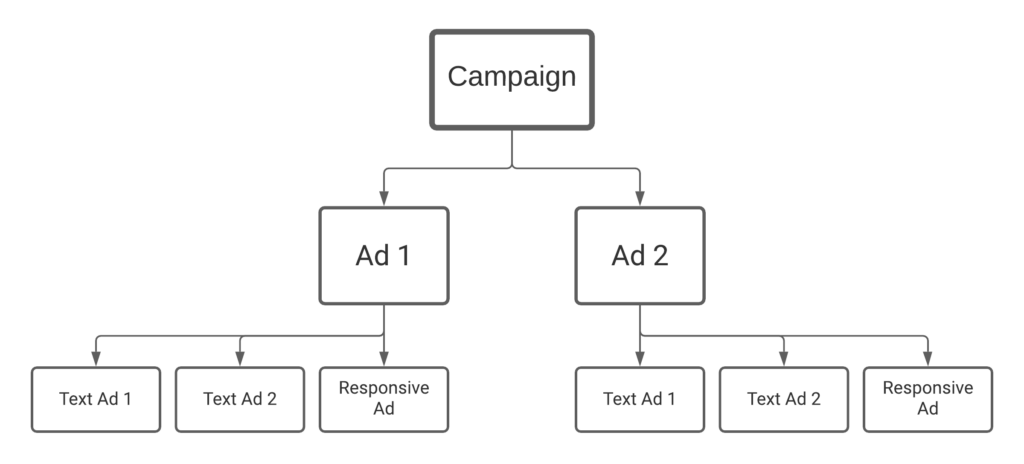
Then input the information about the campaign such as the campaign title. Next, where the campaign will be viewed (by state, country, worldwide, etc.). Once the initial information is completed. Refer to the flowchart below. This shows what is required to create each Google Ad Grants campaign:

A flowchart showing how to build out a Google Ad Grant Campaign

The flowchart shows what is needed for each Google Ad Grants campaign.

Creating the Ads

You can create more ads than shown in the flow chart above. However, two ads are the required amount. For each ad, provide a link to the webpage that relates to the ad. Can not be a link to your social media site. Additional information such as setting a budget goal. Then providing at least 5 keywords per ad. And creating a minimum of two text ads and one responsive ad.

In addition, as mentioned above. Rules on ad creation are different from Google Ads. Review the policy compliance guide. To understand what is not allowed for Google Ad Grants.

Difference Between Text and Responsive Ads

Google Text Ad.

An example of a Text Ad (example provided by Google).

A text ad has three parts, a headline, display URL, and description text. You write the headline and description. Then insert the URL from your website. Your headline and description length need to be close to the word count allotted.

Whereas responsive ads are built using Google’s algorithm. With responsive ads, Google can tweak your headlines and descriptions. This enables your ad to compete in more auctions. Meaning your ad has a higher chance of being shown.

Google Ad Grants – Keyword Research

Example of SEMRush

Example of a keyword search option in SEMRush.

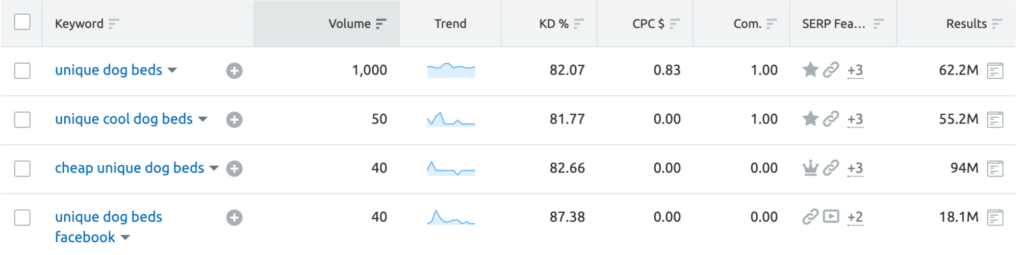
Google Ads is used to attract people to your site. To help with a cause, donations, etc. Google Ads uses an algorithm to determine which ads to show and when. In order to have your ads seen more by the right people. You need the right keywords. To determine the right keywords use. There are tools such as SEMRush. A tool that analyzes keywords. Another free keyword search tool is Google Ads Keyword Planner.

What keywords should you search for? If you are lost on where to start. Google has a resource that shows what types of keywords to use.

Bad Keywords

Now, let’s re-review the Google Policy Compliance Guide. When you are inputting keywords. There are some that are not allowed to be used. Such as single words. As well as overly generic keywords. Once your ad is running keywords will be ranked. Always review your keywords in each campaign often. And pause all keywords with a low-quality score of 1 or 2.

Additional Information

In addition to the Google Ad Grants. Nonprofits will have access to other free services provided by Google. Resources for G Suite and Google Earth and Maps. All available to apply for.

In conclusion, Google offers many services for nonprofits. Watch the Google Ad Grants webinar. Think the grant might help. Why not sign up and try it out. Free advertising that your nonprofit can benefit from. On the world’s most viewed websites.

Web Stories WordPress Plugin: Your Visual Story

Features of the Google Web Stories Plugin

Web stories, formerly known as AMP stories, are an interactive way to engage with your users. And recently, we got the Google web stories WordPress plugin. Today we will tell you about what web stories are and how they can help your SEO rankings. We will also talk about the new Google web stories plugin and what this means for your content. And lastly, we will outline how web stories are changing and what that means for your business.

glasses

It is undeniable that an official WordPress plugin is going to make web stories even more popular. But it will be hard to understand these changes without knowing about the basics of the medium. That’s why we’re going to start with the basics. So let’s define what web stories are and talk about how they can drive traffic for your site.

Web Stories and SEO

A web story is a full-screen visual storytelling medium. These projects take google search results and transform them into an interactive space to make information more visually compelling. The results of these projects are a breath of fresh air for users and, as a result, are highly engaging. This medium creates brand new ways for you to communicate with users. Instead of text, a web story helps content creators speak visually. This visual element can help build trust in your content because the user feels involved.

This visual and interactive experience helps draw-in users. But a user actively participating in a search means they are more likely to retain information too. A standard search result can drive traffic to your website, but a web story can make this process into a journey. When a user finds content via a web story, they are a part of that discovery. This inclusion creates invested users who are excited to engage with your website. Its no wonder why people are so happy to use the new plugin!

WordPress and Web Stories

The advent of this plugin hints that we will start seeing professional and sleek designs from thousands of more users than before. As we know, WordPress plugins can make seemingly impossible tasks very easy. This ease means anyone can now utilize this highly effective messaging platform! These stories might even become an industry-standard you can come to expect from a professional website.

Plugins also help create easy user interactions. This google-designed plugin should be no different; we can expect WordPress web stories to start standardizing themes and templates that users can become accustomed too. Web stories were always highly engaging, but now they will be easy to implement also! The addition of plugin support means web stories will become a new industry standard.

Web Stories Plugin for Business

The new plugin format will affect how content is made and consumed for everyone. On the web development end, we can expect a content boom. Any time the entry barrier gets lowered, people will flock to it and see if it can help their solutions. And a web story is a prime candidate for this. Businesses interested in using a web story can expect the price of implementation to drop. This change will mean affordable and breath-taking design.

story

For designers, this new tool will come with some required learning. While projects are in their early stages, web designers are often learning and unlearn the changing key features. But this education is vital for designers. With massive companies like google and major advertisers backing the project, it will be essential to know. Web designers have to stay on top of trends, and web stories are positively trending right now.

Google Web Stories WordPress Plugin

The new WordPress plugin support for web stories marks the changing of an era for digital marketing. From now on, web designers can quickly implement a web story into their campaigns seamlessly. This new tool means we can expect to see some changes in how we think about web story content. A web story is a full-screen interactive story that displays information similarly to an average google search. This medium lets people see results in a visual format rather than text. This additional layer of information will undoubtedly help your SEO ranking.

A plugin will also make these designs more comfortable with making and using. Because people can easily create their own web story now, we can expect to see more of them. Plugin support will also make designing easier. These factors mean we will begin to see a uniform and cost-effective web story designs all over the internet.

Using a new plugin can be a challenging endeavor and can feel like a serious undertaking. And any update to WordPress can be scary. But Kallen media can make the process easy. If you’re looking for help with adding a web story plugin to your website, contact Kallen media and let us help you.

Social Media Platform Content Marketing : 7 Strategies

Getting your content noticed online can feel like an impossible task. But as long as you know where to put your information, you can successfully market through content. By far, one of the easiest and best places for content marketing is social media. Social media platform content marketing can make a massive difference for your business. So today, we are going to outline seven different strategies for this kind of marketing.

1. Adaptive Content

With many people own a mini-computer that fits in a pocket, it can be easy to find anything with a quick search. One way to have consumers continue to visit your site, blog, or product is to post on different platforms. By developing content that is available within a desktop or on a smartphone, you are creating adaptive content that can be accessed easily.

This image has an empty alt attribute; its file name is tablet-314153_640.png

 2. Target Specific Keywords with Your Content

Before writing your content, think of what keywords you would use to help target your article or blog. Tagging will lead people to what they are looking for within your work. Some quick ways to do this are by including them in the: URL, title, and beginning of the post.

When you target keywords, you bring people to your website. Targeted keywords will generate your Organic Traffic. A plus is that it will increase your search rank. An additional tip is while using targeted keywords, make use of emotional keywords, or words that describe what you crave.

This image has an empty alt attribute; its file name is target-1414775_640.png
Image by Deedster from Pixabay

 3. Native Advertising

One form of gaining readers is through the use of Native Advertising. This advertising can be a controversial form of bringing people to your site to some people. It is widely used and not harmful if not used with ill intent. The only difference between your article and the use of native advertising is paid to build up a product. For instance, if a company pays you to write about them and publicize it as your article, that would be considered a native advertisement. One way to combat the bad stigma is by clearly stating and showing that the article is sponsored and paid for by that company.

This image has an empty alt attribute; its file name is mobile-devices-2017980_640.png

4. Targeting the Right Niche

Just because you can write an article tailored for your readers does not mean it is standing to its full potential.

You would not introduce what your company stands for with a recurring customer, would you? Or vice versa, expecting a new customer to know as much about your company as a returning customer and buyer. It is good to know your audience but even better to know who makes up your customers and buyers. Understanding your niche is also beneficial if you are into Google Analytics. An additional way to keep readers coming back is at the end of an article, and you have suggestions for similar pieces, blogs, and products.

This image has an empty alt attribute; its file name is email-4284157_640.png

5. Create Raving Fans

Whether they are new or a returning reader or buyer, you want them to continue to view your website and articles. Some surefire and straightforward ways to do this are by making sure you produce quality over quantity material, suggest similar materials, and collect their information.

One way to improve writing quality is by reading and writing more. But writing more can be the hard part. Another way is to suggest similar articles that can be found on your website. You preserve the readers, so they revisit your site on separate occasions. Additional action is to collect their information. Their email, for instance, whether it is a banner across their screen when first visiting or alongside similar ads suggestions, collecting data is a must.

This image has an empty alt attribute; its file name is man-1459246_640.png

6. Make it Easy to Navigate Your Content

In an age of minimalism and looking sharp, the same will apply to your page! Do not overload your page with content. It is understandable to show your reader how much great content you have, but that can do more harm than good.

Less is more when it comes to building up your articles for content marketing. You can separate your pieces with images to create space. Or divide your pages and reports through the use of tabs. By having tabs that can separate content, you make it easy to navigate your content while also increasing the probability that the reader will stay on your site, which will in-turn increase your SEMrush score.

This image has an empty alt attribute; its file name is dual-screen-1745705_640.png

7. Evolve Gradually with Competitors

Everyone wants to be the best in the game. People are creative, and they are learning to become a great writer. These are all things the social media platform content marketing is trying to find. One other thing you can do to improve your skills is to keep up with competitors. Stay updated on them. What are they doing that maybe you are not doing or should improve?

Evolving with them does not mean to focus on them. Do not make this your sole purpose or goal. If you focus on your competitors, you will create a bubble for yourself.

This image has an empty alt attribute; its file name is secret-3650080_640.png

Google AdWords Activism: How We Can Help

For-profit activism in the private sector is rare and often more about optics than anything else. That’s one of the many reasons its important to support real heroes who do work to help our communities. One easy way marketing companies can show our support is by connecting these organizations to advertising grants.  Communication can be a costly challenge for these companies. But Google AdWords can help. Google AdWords activism is growing every day. But how does it work?

Google AdWords is a grant program for nonprofit companies. This program offers grants of up to 10,000 dollars to registered organizations to reach out to target markets. The vast majority of nonprofits operate with less than one million dollars in the budget. This budget means that in the best case, a communications budget would be around 150,000 dollars. A free google ad grant can increase this budget by 15 percent. Imagine what it could do for a smaller company.

How Marketers Can Help


Learn about nonprofits in your community. If you find a nonprofit who you think could use your help, reach out to them and explain what you’re offering. And if you can, offer your services for a reduced cost. Nonprofits can struggle to gain attention; this is where marketing excels. By directly connecting a nonprofit to an ad grant program, you can facilitate significant change.


Lots of nonprofits don’t know about the resources marketing firms are aware of. The advertising landscape changes fast, and the professionals in the field might have more accurate information. Marketing agencies need to work together with nonprofits. Because together they can get a message out there. So how does AdWords work? First, you have to register.

Qualifying for Google Ad Grants


So what are the requirements for a Google AdWords grant? First, you have to be a registered charitable nonprofit. The service is not available for government entities, health care institutions, or schools. However, Google does offer a similar program for schools called Google for education. In the United States, this means being an official 501(c)(3) organization. After this, you must register with Google, through Tech Soup.

Registering with google means creating a nonprofit account. After requesting a nonprofit account, Google will verify your nonprofit status. Google uses Techsoup to handle its verification process. Once Techsoup confirms a nonprofit, Google will notify the company, and they are eligible for their free grant! Once checked, these companies are also suitable for free access to G-suite products and a separate YouTube nonprofit program.

Google AdWords for Activism


Once processed and verified, you can begin accessing google ad grant finances. Google has placed a daily limit of 329 dollars. Google’s money is intended for use in key-word targeted campaigns that produce text ads. Unfortunately, Google will naturally place these ads below paid ads. This placement means that money needs to be spent wisely. Google AdWords activism’s purpose is to create highly targetted ad campaigns. So why are some areas where these ads excel?

Google text ads have an incredibly broad reach. So if you need to broadcast information, they are nearly perfect tools. Because of this, they are connecting people through text ads is a highly effective tactic. Connecting with people is vastly vital for grassroots activism, and Google AdWords can help similarly because targeted advertisements allow organizations to gather specific supporters or financial backing. These tools can be used for any targeted text-based ad. However, these particular uses are highly successful tactics.

Examples of AdWords at Work


Here at Kallen Media, we have seen the power an ad grant can have on a nonprofit. Connecting these organizations with free advertising capital has been a cornerstone of our operations from day one. From connecting students to after school activities, to fundraising Kallen Media is proud to stand with the community we’re growing in.

In the past, we’ve helped the Tucson girls chorus promote their valuable service. In the past, we have helped companies through every step of using google ad grants. To use Google ad words, activism is the perfect way to ensure a brighter future.

Activism in Marketing


As marketing agencies, we have a voice and a platform. One of the best things companies can do to help people is amplified their message. Advertising grants provide tools for nonprofits to reach out and connect with their communities. The change will not come overnight, and for lasting progress to be made, we must all commit substantial resources and time. One area where all of these goals intersect is google ad words.

Google AdWords can help establish nonprofit social service organizations, which in turn will aid everyone. If you want to learn more about google ad grants or need help developing service for your nonprofit, contact Kallen Media via our website. To learn more about how you can support the black lives matter movement, please visit their website.

Free Google Ads Credits to Support Small Businesses

Sundar Pichai, CEO of Google, released information on their plans to respond to the ever-growing COVID crisis. This $800+ million plan targets health and government organizations, frontline pandemic workers, and SMBs (small businesses). Most valued for entrepreneurs and small business owners is the opportunity to receive free Google Ads credits.

Where is the Money Going?


Google plans to commit a total of $540 million to small businesses in the form of investment funds for financial institutions and Google Ads credits for SMBs.The rest, Google plans to give $250 million in ad grants to the World Health Organization and other government agencies to run public service announcements on protocol and relief funds, as well as other resources. 

adwords

AdWords

In ad credits alone the $540 million to small businesses divides into $340M. with the rest to be distributed to financial institutions around the world to help provide small businesses with access to capital. 

Google Ads Credits are mostly a form of online currency used to run advertising campaigns through Google’s multitude of outlets. Credits are purchased and spent on advertising slots in places like YouTube and Google searches, etc. If you’d like to delve deeper into that subject, here’s a good start. Google’s plan to support SMBs with free credits will allow some smaller companies to be able to market themselves in a competitive advertising space that they may not otherwise have been able to afford. 


Why Are Ads Credits More Important Now?


These are challenging times for all of us. Currently, many people are unable to work or visit anyone in their lives. And while some of us can work from home, some can’t. For small businesses, it can be especially severe in the current climate to stay afloat. With everyone locked inside, it’s challenging to reach potential customers and drive them toward your products or services. Without the normal flow of business, it becomes more challenging to afford to run advertisements to enter your target market. What you need is an online marketing presence that stands out and gets your website traffic. That may seem like a daunting task to accomplish, but with help from a team that’s won thousands of business driving clicks for their clients, you can still see your business flourish regardless of the challenges we all face currently as business owners.


Google’s commitment to small businesses is especially important now because it can help SMBs thrive despite the current situation. Running advertisements for your company is crucial! Google’s opportunity for free advertising may be vital for the survival of your livelihood. 


Google Ads are one of the most effective ways to reach potential consumers in the digital age. Being a company with experience in running Google Ads accounts for our clients, the results tend to speak for themselves. Google runs advertisements on nearly every website. No doubt, you run into ads every single day when browsing the web. Now that everyone is home, online traffic is at an all-time high. Many of us are working from home, and our best form of regular communication is digital. Now more than ever is the right time to consider running an advertising campaign with Google Ads.


Getting Access to Ads Credits

seo

Small and medium-sized businesses that have been active users of Google Ads since at least Jan 1, 2019, can get these credits. Google will credit eligible companies will be through their Ads account within the coming months that their credits have arrived. After that, these credits apply to any of Google’s advertising channels: (Search, Display, YouTube) in all campaign types. Additionally, businesses may utilize the loans at any time until the end of 2020.


It helps to have an experienced team on your side when planning an online advertising campaign, don’t go at it alone! Many companies have the knowledge and tools to manage your Google Ads account for you, allowing you to focus on the core of your business while knowing you’re taking advantage of the opportunities Google’s COVID relief fund is providing.


A Good Place To Start!


Online advertising, in the right way, takes experience and can be especially complicated. However, with assistance from Google, there’s no reason not to take advantage of free advertising space. If you haven’t run an online ad campaign recently or aren’t sure of the plan you’d like to make, now is the right time to get in contact with a team that can help design something that will work for you. At Kallen Media, our primary objective is to help your small business thrive in the online world, even within the touchy consumer market we’re in today. Together, we can create an online ad campaign that’s truly special. Free google ad credits can help your next campaign. Contact Us and let us help your business thrive!

2020 Beginner’s Guide To Google Ads Pay Per Click Strategy

Within the digital world, there are tons of different outlets to spend your marketing budget.  Pay per click campaigns through search engines should be at the top of your list of investments.  These advertisements allow your company to stand out above the organic competition. This strategy is the opportunity to be seen and beat the larger organic pages, which you may not be ahead of otherwise.  That is why I have created a beginner’s guide to google ads.


This article is going to cover the pay per click advertising campaigns available for small businesses through search engines.  All these programs are going to be self serve advertising programs as well. The different company’s plans share many similarities.  In many cases, building a campaign on Google Ads can be easily transferred to both Bing and Yahoo. This strategy helps save time, creating multiple of the same campaigns on different platforms.  Because of this, I am going to focus on building your first pay per click campaign using Google Ads.


Google Ads


The behemoth of digital advertising platforms is Google Ads.  Google Ads allows for a variety of ways of business to get in contact with their desired markets.  Their platform has two different primary forms. The first is smart campaigns, and the second is going to be a manual campaign.  A smart campaign is generalized with topics and allows for minimum editing.  


This campaign is for a beginner or someone who has not utilized Google Ads before.  The recommended campaign is going to be manual. This setting allows for complete customization and targeting of audiences.  If you are interested in learning more, Google offers its Google Ad Certification for free online.  Similarly, if you are a nonprofit, you should read our article “How To Setup Google Ad Grants in 7 Steps to find out how you could be eligible for a $10,000 ad spend the grant.


Introduction to Campaigns


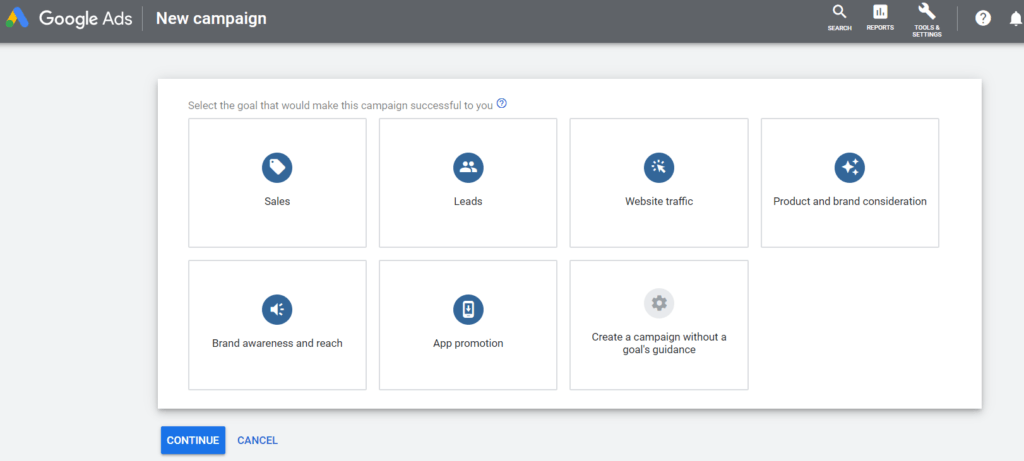
For the rest of this section, I will focus on the manual campaigns.  The next step is going to be what kind of goals you want to set for your campaign.  There are a variety of options to choose from for your campaign. Most of the time, I recommend tracking sales as this is typically the goal of most campaigns.  Similarly, there are options to monitor traffic and specific niches depending on your campaign goal.  

Congratulations!  You have completed the first step in the beginner’s guide to google ads.


Campaign Introduction page


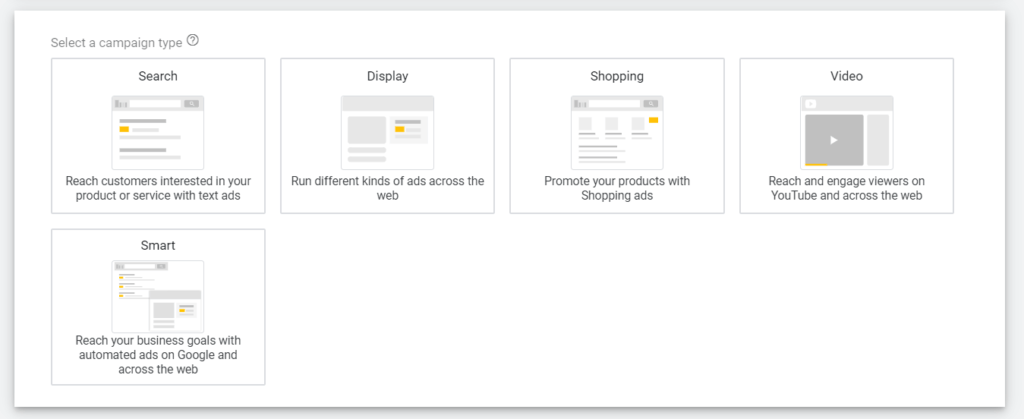
The next step is selecting the campaign type.  For Nonprofits using the Google Ad Grant, you will only be able to run a search campaign.  Otherwise, there is also the option of display, video, shopping, and smart campaigns. Display ads integrate themselves across the web, similar to Smart campaigns.  These are ads that “follow” users after they have expressed interest in your product. Shopping campaigns are featured product pages. Finally, video ads run across Youtube, the world’s largest online video platform.


Google Ads campaign type


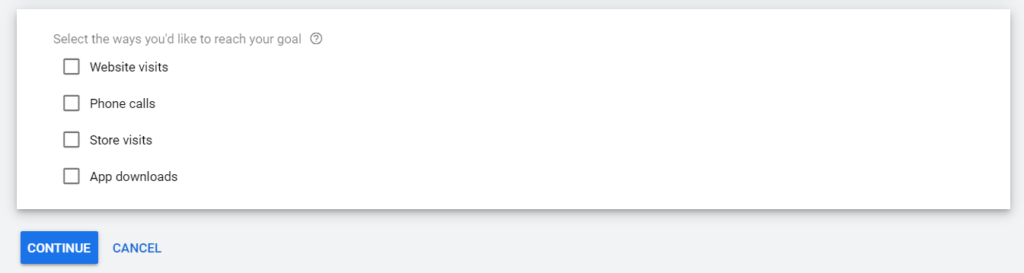
The next step is determining what action you wish to track.  This section should consider what you will consider a conversion. Website visits can mean visiting a specific page.  Similarly, phone calls are referencing calls directed from the advertisement. Store visits calculate themselves using directions to your business.  Lastly, there are app downloads if you are looking to promote a mobile application.
 

Google Ad Conversion tracking goal


General Settings


Once this step is complete, it is onto the general settings page.  This section is where you can name your campaign. I recommend choosing something that relates to the ads.  The more specific, the better.
 

Here you can verify what networks you want your campaign to be shown on, including the search and display networks.  Next, you can choose the geographic region your ads are displayed. The more specific you can be, the better.  Make sure you are targeting only the areas relevant to your product or service. There is also the option to choose the language and specific demographic to focus on if you have that information.


The next step is setting up a daily budget.  The budget is the maximum amount you are comfortable with Google spending in a day.  To find your monthly budget cost multiply the daily amount by 30. This budget will ensure you do not go over your advertising budget on accident.  Forbidding strategy, I utilize the maximum conversion setting. This tactic lets Google do the advanced bidding for you for keywords.


At the bottom of the general settings, you will find the ad extension section.  Here is where you will be able to place Sitelink, Callout, and call extensions. Sitelink extensions take people to specific pages of your website.  A callout is similar where you are featuring a product, service, or feature you offer, without the link aspect. Finally, a call extension allows you to add a phone number to your ads.


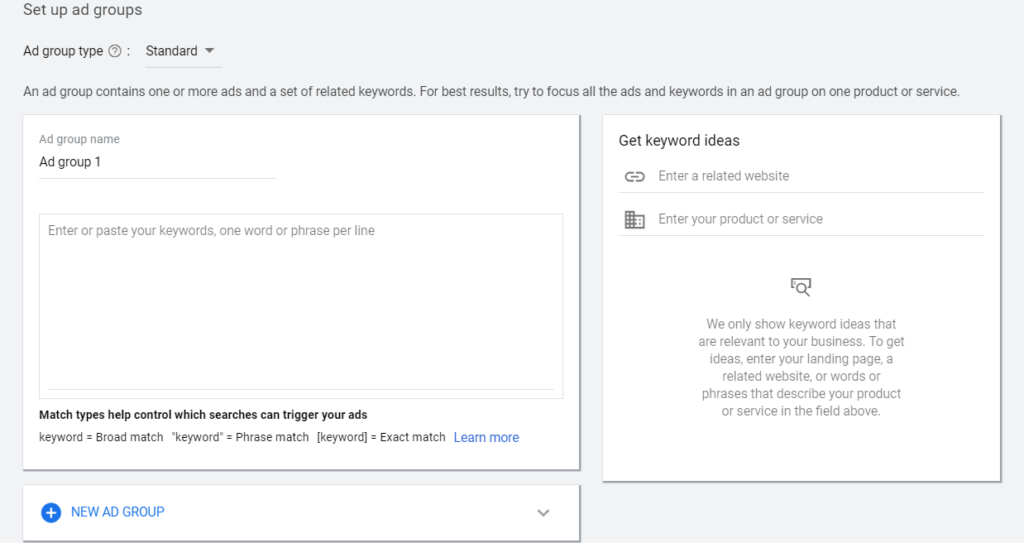
Set Up Ad Groups


Setting up ad groups


Setting up the ad groups is how you will determine what searches your company appears.  First, you will want to name your ad group. After that, I recommend entering your website in the related website field.  This research will have Google give you a list of suggested keywords to rank for in your niche. Keyword research and planning is one of the most critical aspects of creating your campaign.  


I would highly recommend contacting us for a free consultation on building your first campaign.  Utilizing long-tail keywords is the best way to make the most out of a smaller advertising budget.  This strategy may mean less overall traffic, but more of the traffic has a higher chance of converting. The number of keywords per ad group can help immensely.  In some cases, you may only want a few specific words, while in others, you may have over 100!


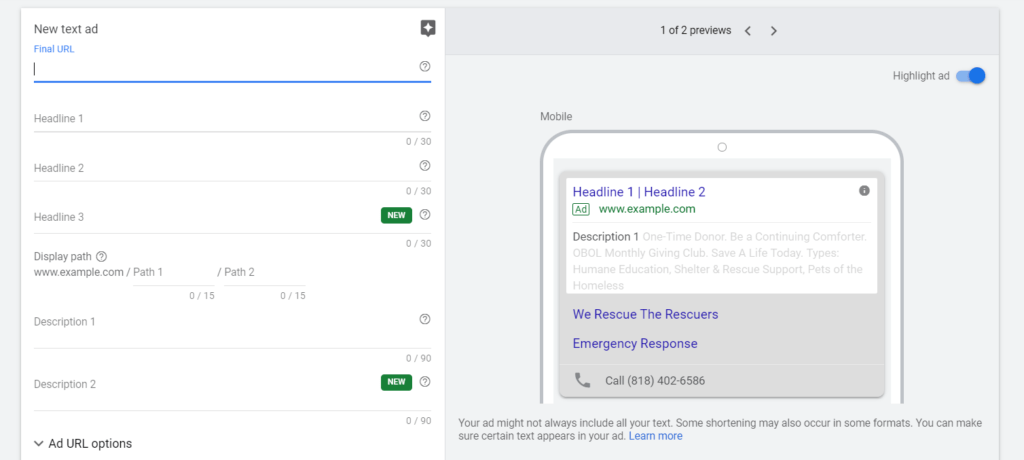
Create Ads


Now it is time to create what your potential clients are going to see!  This process starts by choosing the landing page. You will want people to go to after clicking the ad.  Having a call to action on the page is essential for gaining a high conversion rate. Next, you will want to create headlines that grab the reader’s attention.  Try to imagine what kind of language and wording would excite yourself to click.  Heighten yourself to an expert Google advertiser since you have nearly completed the beginner’s guide to google ads.

 

Creating Ads


Once the headlines are active, it is time to write descriptions.  These will describe the purpose of the ad, and what users should expect.  Headlines are a great place to write your mission or the goal for your ad. The ads will then be combined with the extensions to create what your searchers will see.


Confirmation of Ads


Finally, it is time to finish and confirm your campaign.  Look over your campaign to make sure all the information looks correct and good to go.  Once finalized, your ads will be live and ready for potential clients to find.


Conversion and Traffic Tracking


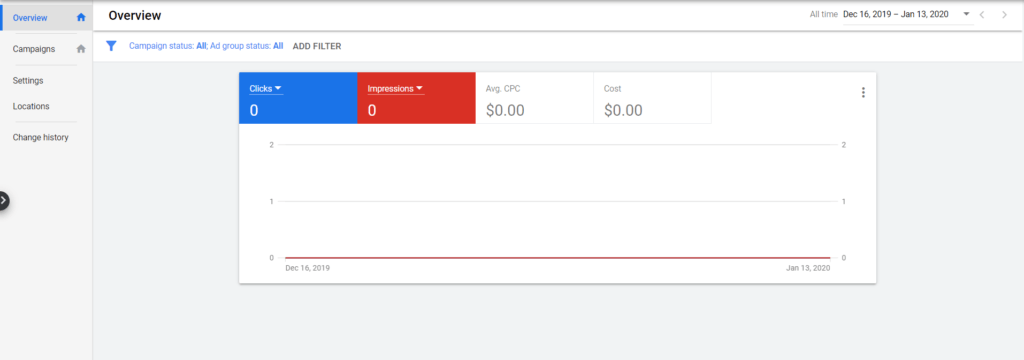
Your ads should now be up and running.  While your setup is complete, the work is far from over. Currently, your campaigns must be watched and tracked.  Tracking is the only way your business will be able to tell if it is worth investing in Google Ads.  Below you will find the Google Ads dashboard.


Google Ads dashboard


The clicks and impression sections can both be changed to view a variety of statistics.  As your campaigns run, more information will be gathered and presented in the dashboard. Running a successful campaign means there need to be changes and close attention paid.  This strategy is why we offer Google Ads management services to provide both detailed reports and plans on the results of the campaign.


Competitor Search Engines


After this, you should have a pretty good idea how to get started creating a pay per click campaign on Google.  I would recommend you use Google Ads to create your initial campaigns. The reason is that the top competitors allow for these campaigns to import directly.  Both Bing and Yahoo allow this, which are the two most significant search engines aside from Google. The dashboards are slightly different, but the overall structuring is the same.  Feel free to investigate the other channels to see if you can find success for your business. From Kallen Media’s experience, we have found much less traffic and cost, but also more reduced overall conversion quality.


How To Get Started With Pay Per Click


If you are a business struggling to get found online, these pay per click services is perfect for you.  By investing money, you can target the specific niche that buys your product and services. There are hours of research done to ensure you are maximizing your campaign.  No matter what, it is crucial to stay informed on how the digital landscape is shaping the future of advertising.  I hope you enjoyed my beginner’s guide to Google Ads if you or your business is interested in starting a pay per click campaign on a search engine or social media outlet, email nathan@kallenmedia.com or call 773-524-1483.

Introduction To Structured Data

What Is Structured Data?

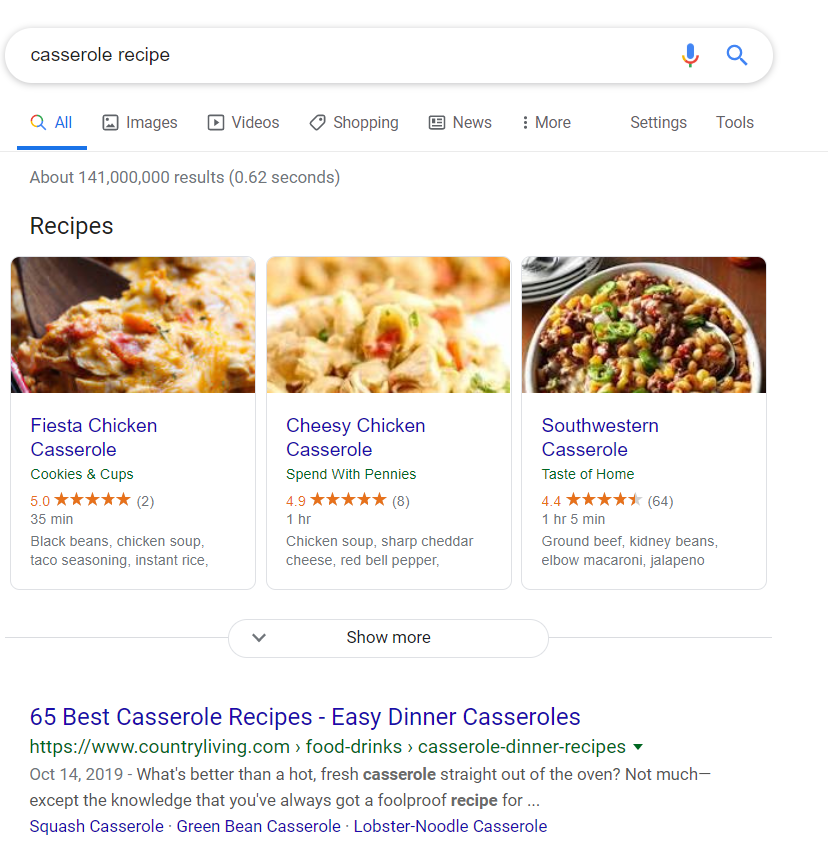
Today I am going to cover an introduction to structured data and why it is essential for your website. Most people are familiar with using search engines to find results based on their search. However, what people may not be as familiar with is why your search results look the way they do.  Before we dive in, I want to start with an introduction to structured data that may seem more familiar. Take a look at the image below. You may notice a variety of differences within each result that comes up for the “casserole recipe.”  This structure is because of structured data written on the backend of the website.

Google structured data in recipes

At the top of the search results are card-like structures.  Instead of a standard link, you get the recipe name, author, review ranking, and even some ingredients.  All of this is thanks to the structured data. Google uses data from a website’s “site map” to show more detailed results.  When you add a specific piece of code to your website that is structured data, it allows Google to augment your listing. When standing out from the competition is vital, this will give you an advantage. All of this together is why structured data is becoming such an essential holistic search engine optimization practice.

Where Does Structured Data Come From?

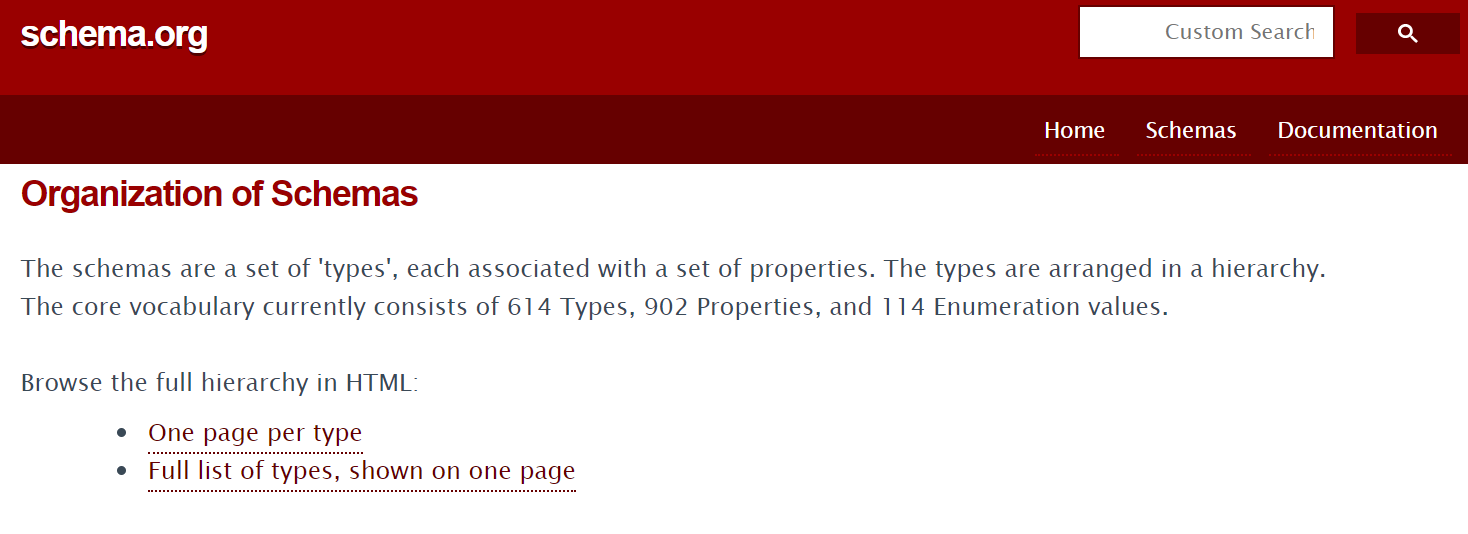
Structured data is what tells Google and other search engines what is important and what it should be displaying.  The project is primarily based on a web project called Schema.org. This website is a database for a markup language used to communicate with the search engines.  The communication happens by using a method of encoding data called JSON-LD. There are other ways available, but for this article, we will be focusing on Schema.org and JSON-LD.

Schema.org website information

Now you know that structured data is composed of JSON-LD markup.  The markup taken from Schema.org can now convert to structured data. Within the website, there are a variety of sections that highlights the type of data that can be composed.  Some great examples would be recipes, business hours, or author name. Not all posts or page types can break down into structured data for all search engines.  This is why it is essential to also take a look at the Google-approved markup. By doing this, you will ensure that the largest search engine can correctly index your website.  Indexing a website is when Google sends out their bots, which go from website to website capturing data. These bots are often called crawlers and are critical factors in how your website ranks in search results.

Website Integration


But now lies the question, what do we do, and how do we integrate it within our website?

Most people are not going to want to learn the code and backend of JSON-LD.  Luckily, there are a wide variety of other ways that you can implement your Schema markup.  The most common is going to be through utilizing a plugin. Currently, there are a wide variety of broad SEO plugins on the market.  These plugins are going to be the most comfortable option for most users. This will allow you to fill out data about your website and posts from a smooth user interface.  Some great examples of plugins to use would be the Moz or Yoast plugins. These companies offer both free and paid options that vary on the amount of support and opportunities given. This research is a significant first step in creating an optimized website while still being introduced to structured data.

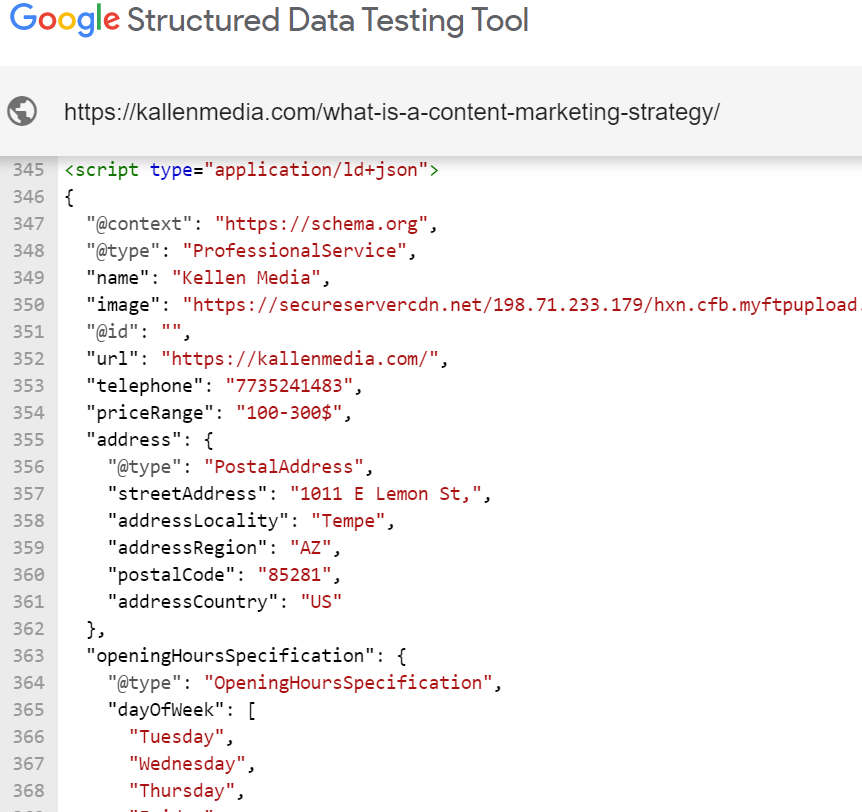
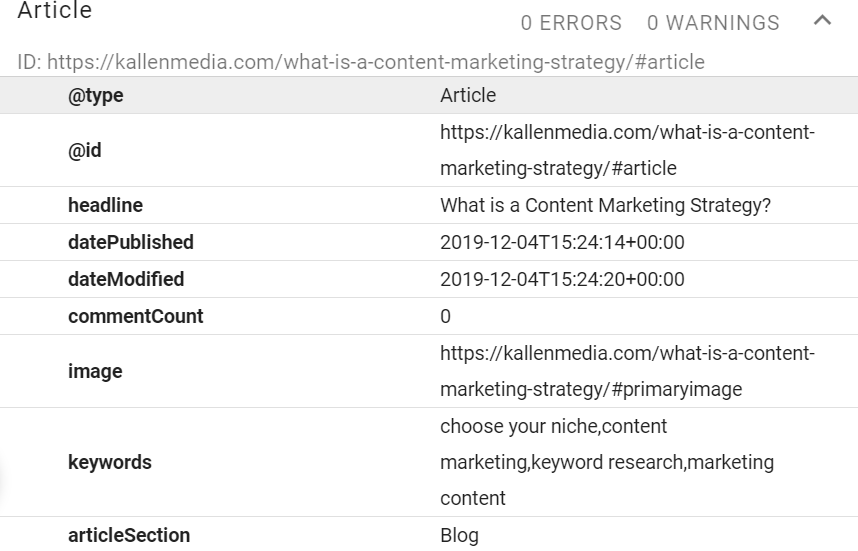
A great alternative for people who may want to dive a bit deeper into their website would be to utilize Google Structured Data Testing Tool. Before we do that, I want to show you what the JSON-LD code for structured data will look like.  Don’t be overwhelmed by the code. If you focus on the few key points that I highlight, you will be able to use templates on most of your pages.  The first picture represents the JSON-LD code put in while the second represents that outcome.

JSON-LD Code from Kallen Media
JSON-LD information it tells to search engines

Google Tools

After looking at the picture you should be able to see that there is a connection between the left and right sides.  This means that you will check Schema.org for the parts of markup required. For the example above, I used an article from Kallen Media.  The “@context” and “@type” will always start on the JSON-LD code side.  Below that is where you begin to describe to search engines what your page is composed of.  The reason we do this is that it is harder for computers to understand the meaning and context compared to humans.  By assigning values to names and specific aspects, it tells the search engines what it should be showing searchers. These values can change based on what type of post or page you are making your structured data markup.

Using Google’s Structured Data Testing Tool is one of my top recommendations when first getting acquainted with JSON-LD and Schema.org.  This is because it will tell you the errors that will occur for Google. This is important since Google is the top search engine and you want your website showing up!

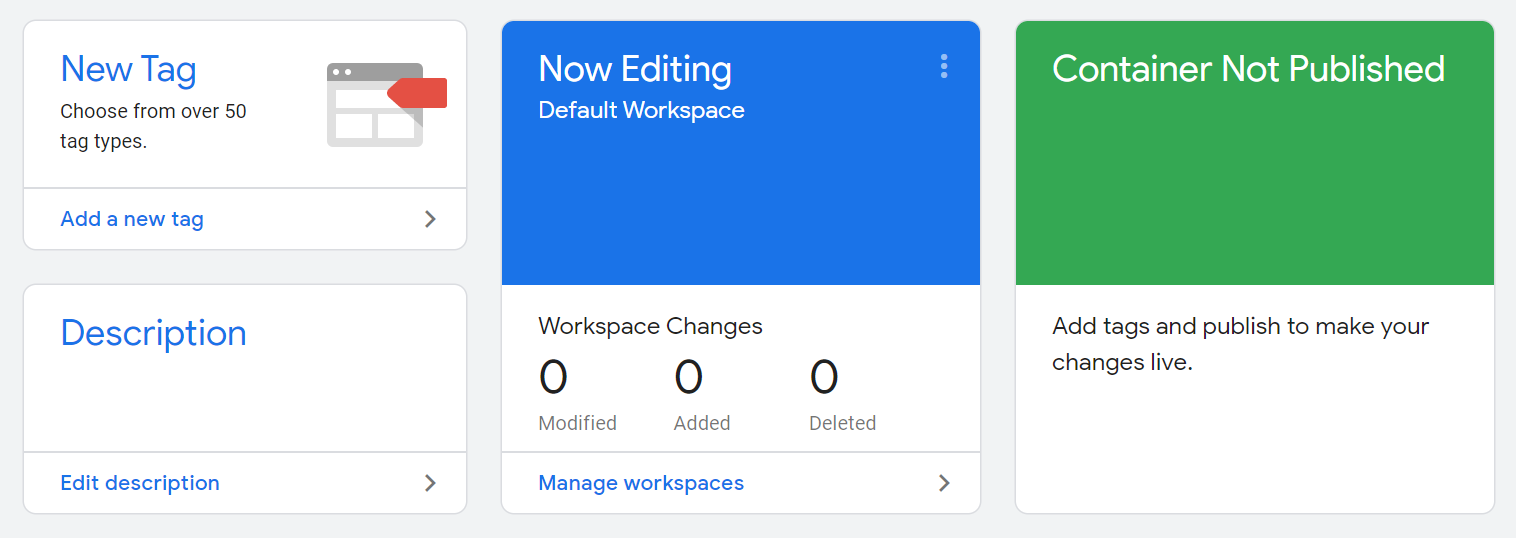
Once you have created the markup that you want to add to your site, there are a few options for how to install it.  The easiest and most effective way is going to be using Google Tag Manager.  This interface allows you only to have to add a few pieces of Global site code to your website, instead of every bit of structured data you have done.  If you do not feel comfortable doing this, we offer search engine optimization services that include structure data creation for your website.

Google Tag Manager homepage

Finalize Your Data

Google Tag Manager will allow you to enter in the JSON-LD added to your database.  This then will allow all search engines to read the structured data snippets that you have.  However, you will need to slightly change your code for Google to accept it. The easiest way to do this is to paste the code into Yoast’s Script Helper.

Once you have done this, you can test your tags from within Google to make sure they are activated.  Once complete, your structured data should be ready to go for your website. This will mean that search engines will be able to read your content more accessible.  That means that your website should start standing out from competitors who invested in structured data. We are eager to see how structured data impacts businesses we work with.  If you have your website showing up using structured data snippets, let us know in the comments! Finally, if you need assistance setting-up SEO practices for your website, please reach out to Nathan@kallenmedia.com for more information on getting introduced to structured data.

Get In Touch
close slider

    Get In Touch