
Given the intense competition that exists in the current internet world, it is critical to learn about search engine operations in order to enhance the performance of your website. One aspect that needs to be looked into is Google’s site cache. This is significant because it determines how your site is cached, indexed, and displayed on the results page. If you are into SEO, then you should understand how the cache system works. To build a strong foundation, you can also learn more about what SEO is and how it impacts your website performance.
Here is an informative article on the Google site cache that will help you get started.
What Is Google Site Cache?

Google site cache is defined as the stored copy of a web page captured by Google during its indexing. Google captures your webpage and stores it at some point in time. This stored version of the webpage is used by Google to present your content if, for any reason, the original page cannot be accessed or if it takes too long to retrieve.
Googlebot visits and analyzes your webpage content, and it stores a cached version of the page. This process is closely related to how search engines rank websites, which you can explore in detail in this guide on Google SEO ranking. The stored version of your webpage can then be viewed by both users and SEO experts to see how Google views a certain page. Moreover, using the Google site cache, you can determine if Google has updated its records after making changes to your web pages. Google cached versions of your pages are not necessarily the latest real-time versions, since it all depends on how often Google crawls your site.
Why Google Cache Is Important for SEO

Helps in Faster Indexing
The Google cache has an important part to play when it comes to improving the speed at which the indexing process is completed. It becomes evident that your website is cached by Google when it has been discovered and stored by Google. This also shows that the page has been indexed and is now available for display on the search engine results pages. Proper indexing plays a key role in overall SEO success, which is why many businesses invest in professional SEO services to improve visibility.
Improves Website Visibility
Cache pages will ensure that you can always access your website content, even if the live page goes down due to any technical reasons. In case your live page goes down for some time, visitors to your website can view the cache page version until such time as the problem on your site is sorted out.
Useful for Troubleshooting SEO Issues
Google’s cache facility can help you determine the SEO problems with your site. Through comparison of your cached content to the latest one on your site, you will be able to tell whether Google has noticed any updates in your site. If Google’s cache still shows old data, then there are some SEO issues. In such cases, focusing on technical SEO services can help resolve crawling and indexing problems more effectively.
Backup of Web Pages
Another advantage of Google cache, which goes unnoticed by many people, is its use as a backup tool for the site content. In case your web page gets deleted accidentally or becomes inaccessible, then you can always fall back on the cached content available in Google cache.
How Google Site Cache Works
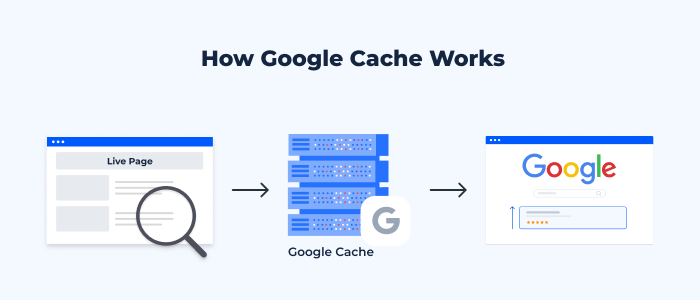
Crawling and Indexing Process
This process starts from Googlebot, which is the search engine bot for Google. The Googlebot goes through your website and analyzes your content. Ensuring your pages are properly optimized with the right structure and keywords is part of effective on-page SEO services and directly impacts how Google understands your content and gathers information about your webpage. While analyzing the content, the Googlebot studies a variety of factors, including text, images, hyperlinks, and meta tags. When the process is completed, the page will be indexed and stored in the Google database.
Storing Cached Versions
Once it has indexed your website, Google will take a snapshot of your webpage. It stores this snapshot in its servers and is an actual copy of the webpages as they appeared when they were crawled. Most of the web pages’ contents are stored in the snapshot, but there might be some dynamic parts that will not make it into the snapshot.
Cache Update Frequency
Factors determining the frequency of refreshing cache by Google include the extent to which your content changes frequently, the authority of your website, and the frequency of crawling. Content-rich websites that update their information often will see the cache refreshed frequently. Regular content updates through strategies like blog writing services can significantly improve crawl frequency and rankings. In contrast, those websites that are static or infrequently updated may end up having an outdated cache.
How to Check Google Cached Pages
The checking of cached pages on Google is a very straightforward activity that can give you some vital information about your site’s indexing status. It may be done through using the Google search engine or even particular search operators. Whenever you go to the cached page of your website, you can see its date and time of crawling by Google, thus understanding how fresh your indexed data is.
The checking of cached pages is essential for all SEO specialists who want to check if their site has been changed. It also helps identify issues that may affect performance, similar to insights shared in this guide on common blogging mistakes, according to their desires, and has been seen by Google.
Common Issues with Google Cache

Cached Page Not Updating
Another problem that often occurs involves having a cached copy that is outdated since it does not contain the latest changes on the web page. This often occurs because Google has not been able to index the page once more after the changes have been made to it. This is due to infrequent crawling, technical problems, or poor internal linking of the pages.
Missing Cached Version
At times, there might be no cache available at all on the web page. This is possible due to various reasons, such as the recent creation of the page or restrictions. Weak backlink signals can also delay indexing, which is why understanding the importance of backlinks is crucial. Having restrictions in place against crawling, the use of certain meta tags that block caching, or perhaps because the page has not been indexed by Google yet.
Outdated Cached Content
The cached information being outdated might mislead visitors and negatively impact SEO. If there are major differences between the cached copy and the live website, it could be an indication that the page was not crawled by Google lately. Refreshing your content will make Google crawl the site again.
Google Cache vs Browser Cache: What’s the Difference?
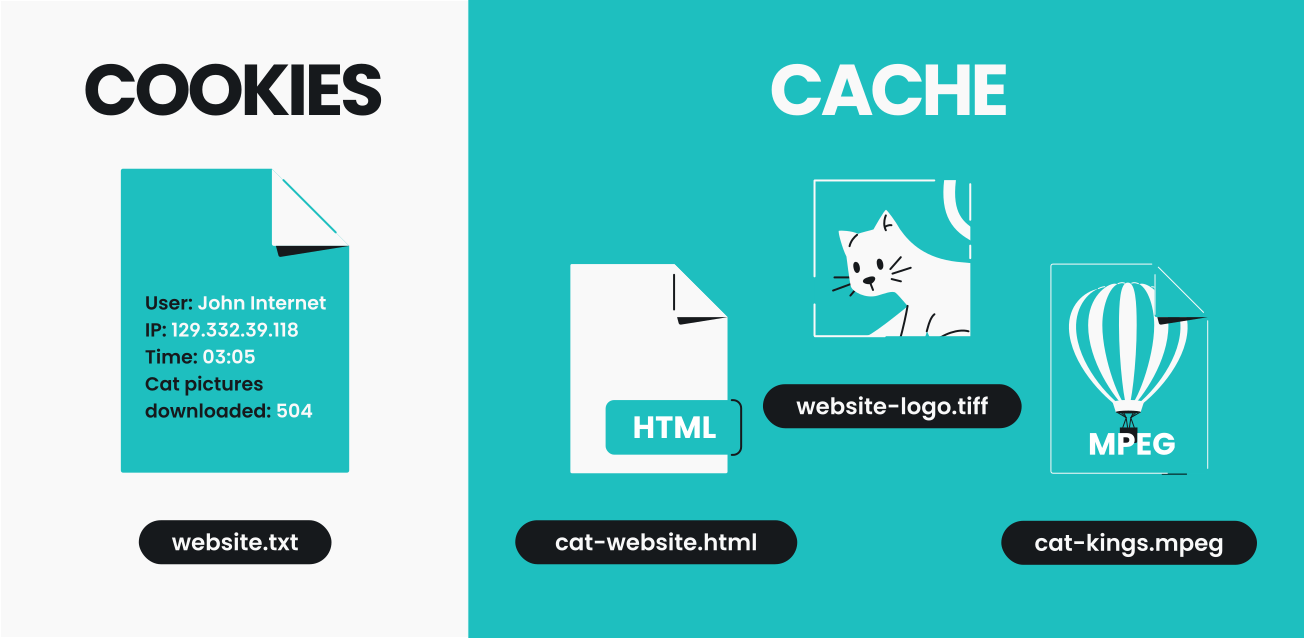
The main difference between Google Cache and Browser Cache lies in their functions, even though both systems deal with keeping copies of web pages. Google creates Google Cache and deals with taking snapshots of your webpages to facilitate the indexing of the latter. The cache is available from the search results, and it shows what Google thinks about your page.
Browser Cache, unlike Google Cache, is created locally on the user’s computer. It is used to save all information loaded during the previous visit to your web page, including images, scripts, and stylesheets. By caching your web page, Google helps you load it faster when you visit it in the future.
Both Google Cache and Browser Cache are important for search engine optimization of your web page.




This post really highlights how technical SEO aspects like caching are often overlooked. Optimizing Google Site Cache seems like a simple yet effective way to improve both page speed and search rankings, which could benefit many websites without major overhauls.
Thank you for sharing this insight! You’re absolutely right—technical SEO elements like caching often don’t get the attention they deserve, even though they can have a meaningful impact. I’m glad the post helped highlight how something relatively simple, like optimizing Google Site Cache, can contribute to better performance and visibility without requiring major changes. Really appreciate your thoughtful input!
Thank you for your thoughtful insight! You’re absolutely right technical SEO elements like caching often go unnoticed, even though they can have a strong impact on performance. Optimizing Google Site Cache is one of those small but effective improvements that can enhance both speed and search visibility without requiring major changes. I really appreciate you highlighting this point!
Thanks for breaking down how Google Site Cache works—it’s easy to overlook but really important for SEO strategy. I especially appreciated the part about how cached versions can impact visibility, especially when dealing with time-sensitive content. It’s a small detail that can have a big effect on how your site performs in search results.
Thank you for your thoughtful comment! You’re absolutely right—Google Site Cache is often overlooked, but it can play a significant role in how content is indexed and displayed. I’m glad the section on time-sensitive content stood out to you, as that’s where caching can really impact visibility. Appreciate you highlighting this and sharing your perspective!
Thank you for such a thoughtful comment! You’re absolutely right Google Site Cache is often overlooked, yet it can have a real impact on how content is indexed and displayed. I’m glad the point about time-sensitive content resonated with you, as caching can definitely influence visibility in those cases. It’s those small but strategic details that can make a big difference in overall SEO performance. Really appreciate you sharing your perspective!