
You have done your best effort in getting ranked on the first page of Google. But there’s one harsh reality here: ranking is just part of the equation. If your meta description is long, short, or uninteresting, your users will not stop for it and simply go ahead to click on your competitor, which can negatively impact your overall performance in SEO services.
Meta description length is one of those basic SEO fundamentals where everyone goes wrong, either neglecting it completely or stressing about its exact length. In this guide, we are going to give you all the information you need regarding the perfect meta description length, from its characters to when mobile takes precedence, and whether it impacts your rankings.
What Is a Meta Description?

A meta description is a short HTML snippet, typically one to two sentences, that summarizes the content of a webpage and plays an essential role in on-page SEO optimization. It sits inside the <head> section of your page’s HTML code and is not visible on the page itself. However, search engines like Google often display it in the search engine results pages (SERPs), directly beneath the clickable title link of your listing.
Think of it as your page’s elevator pitch. It’s the short paragraph that tells a searcher: “Here’s what you’ll find if you click this link.” When written well, it can be the deciding factor between someone choosing your page over the 9 other results on the page.
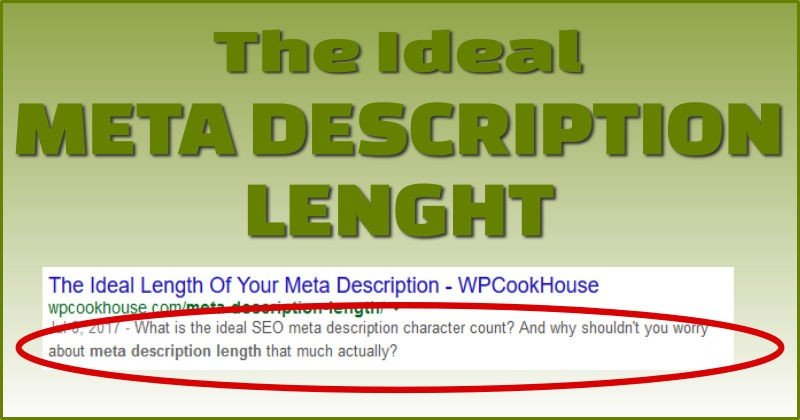
See how the word “meta description length” is in bold? That happens when the words in your description match the search query. It’s a strong visual cue that catches the reader’s eye. We’ll talk more about that in the writing section below.
Why Meta Description Length Matters
You may be thinkingof meta descriptions as something that can be easily overlooked or something you just do because you have to do it before publishing your page; however, that is too simplistic. The length and quality of your meta description directly affect how well your page performs in the SERP, and that is why you should pay close attention to this aspect of your content.
Click-Through Rate (CTR)
Meta descriptions are not a Google ranking factor; Google has confirmed this numerous times, but they strongly influence user behavior and click-through rates, which are key components of search engine optimization strategies.
Nevertheless, a well–written meta description can influence a user‘s click-through rate and therefore indirectly affect SEO. The click–through rate is likely determined by the relevance and quality of the metadata to the user’s intent, thus indicating to Google the relevance or usefulness of results over time. When creating your meta descriptions, think about them as an advertisement for your site in organic search results.
Just as paid advertisements require strong copy to generate clicks, meta descriptions must have engaging, accurate, and relevant copy similar to what is used in Google Ads campaigns to drive users to your page. from the search engine results pages (SERP). Length also plays a vital role in determining whether a meta description is effective. If it is too short, you miss out on using valuable SERP “real estate,” while if it is too long, the most important part of your message may be cut off before being displayed in SERP.
Avoiding Truncation in Search Results
If your meta description is too long, Google won‘t display the entire meta description. Instead, Google will truncate the description based on pixel size, meaning that your call to action, benefits, or persuasive sentences might never get to see the light of day because they were truncated by Google. Because of this reason, the character length of your meta description is more than just cosmetic. By writing for a specific character range, you can ensure that your message will display in its entirety, which is especially important when optimizing content as part of a technical SEO strategy, across devices, without being awkwardly mid-way through a sentence.
First Impressions on the SERP
A visitor will probably read your meta description before they visit your site. Your meta description is often the first piece of text that potential visitors see about your brand, making it a crucial element of your overall content marketing and blog writing strategy. This sets the stage for what they should expect from your website. If it is vague, has too many keywords crammed into it, or is cut off/awkward, great content will not matter when creating a first impression. Conversely, a meta description that is concise, to–the–point, and appropriate in length will portray confidence and authority to your potential visitor prior to them clicking on your title. It quickly conveys to your audience, “We know what you want, and we will provide it” – what a powerful first impression to make against all the other competition for ranking positions within the SERPs!
What Is the Ideal Meta Description Length in 2026?
This is the question everyone wants a clean, simple answer to. The honest answer: it depends on the device, but there are clear, practical guidelines you can follow today.
Desktop vs. Mobile Character Limits
There is less space on desktop and mobile screens to show your snippet. Since Google now uses mobile-first indexing, it’s more important than ever to know both.
- Desktop limit
~158
characters (920 pixels)
- Mobile limit
~120
characters (680 pixels)
- Safe zone (both)
120–158
characters recommended
- Mobile search share
60%+
of all Google queries
You should make making the mobile limit your top priority because more than half of all Google searches happen on mobile devices. Put your most important information, like your keyword, your main value proposition, and your call to action, at the beginning of the first 120 characters. Desktop users will see the extra space from 120 to 158 characters, but mobile users might not.
| Device | Pixel limit | Character limit | Recommendation |
|---|---|---|---|
| Desktop | ~920px | ~155–160 chars | Full description visible |
| Mobile | ~680px | ~110–120 chars | Front-load key message here |
| Safe for both | — | 120–158 chars | Best practice for all devices |
The Safe Character Range to Follow
For desktop, the best practice for 2026 is to keep your meta description between 150 and 160 characters. For mobile safety, your most important message should fit within the first 120 characters. This range gives you enough space to be informative, use a keyword naturally, and add a short call to action without getting cut off.
What About Pixel Width?
Here’s something most beginners don’t know: Google doesn’t actually measure your meta description in characters. It measures in pixels. This matters because different letters take up different amounts of horizontal space. The letter “W” is much wider than the letter “i,” so two descriptions with identical character counts can display very differently on screen.
For example, a description made up of narrow letters like “iliilliiii” will display shorter in pixel terms than one with wider letters like “MWWMMWWM” even if both are 50 characters long. In practice, this means character count is a useful approximation, not a hard rule. The desktop pixel limit is approximately 920px, and the mobile limit is approximately 680px.
To see exactly how your description will appear, use a free SERP preview tool, especially if you are managing your site through platforms like WordPress web design. Like Mangools SERP Simulator, Portent’s SERP Preview Tool, or the built-in preview in Yoast SEO or Rank Math if you’re on WordPress. These tools show your snippet in real desktop and mobile views so you can catch truncation before publishing.
Does Meta Description Length Affect SEO Rankings?

This is one of the most common mistakes people make in SEO, and it’s important to talk about it directly. No, the length of a meta description does not affect how well a site ranks in Google. John Mueller and other members of Google’s own team have said over and over again that the length of your meta description has no direct effect on where you rank in search results.
You won’t get anything extra from Google for hitting exactly 155 characters. You won’t get in trouble for writing 180 characters. And it doesn’t even guarantee that it will use your meta description. If Google thinks that a snippet from your page content is more relevant to the user’s query, it may replace it. Studies show that Google changes meta descriptions more than 60% of the time.
What then is the reason behind the importance of length? Well, the indirect impact on click-through rate (CTR). If the snippet is chopped off at an odd place or is too short to convey any information, it would attract few clicks. In turn, the low CTR might indirectly alert Google that the particular listing does not meet users’ expectations – hence the indirect negative impact on ranking. In summary, the key thing is not the precise word count. Rather, write something meaningful and relevant.
How to Write the Perfect Meta Description

With this information on the character limit and why it is important to follow, we can move on to what needs to be included within these 150 to 160 characters. A good meta description should do four main things.
Firstly, always include the target keyword, as proper keyword placement is a fundamental part of what is SEO and how search engines understand your content. Put the keyword at the start of the meta description to catch the reader’s attention and make them feel like the page will provide exactly what they are looking for. Google highlights keywords when the user types them into the search bar, making the title look more relevant to the reader.
Secondly, offer a clear value proposition. Explain the value the reader will receive from clicking through to the webpage, which aligns closely with building an effective content marketing strategy. It could be something they need to know, something to solve their problems, or even save them time and effort.
Fourth, include a call to action at the end of your meta description. Using a gentle CTA phrase such as “Optimize now,” “Discover more,” or “Download our complete guide” is an effective way to encourage the user to take action immediately.
Fifth, write for the audience and not the algorithm. Meta descriptions should be human-readable; they should feel like the description was written by a human being and not just some keywords stuck together.
Common Meta Description Mistakes to Avoid

Even experienced content creators make mistakes with meta descriptions. Here are the three most damaging ones — and how to avoid them.
Keyword Stuffing
Avoid keyword stuffing
Keyword stuffing means cramming your target keyword or multiple keywords into the description unnaturally, which is considered a black hat SEO practice. For example: “Meta description length, ideal meta description length, best meta description length, meta description length 2026.” Not only does this look spammy to users and instantly destroy trust, but it also signals to Google that your description is low quality. When Google detects a stuffed or irrelevant description, it often ignores it entirely and generates its own snippet from your page content, meaning all your effort was wasted. Use your primary keyword once, naturally, as part of a real sentence.
Using Duplicate Descriptions Across Pages
Avoid duplicate descriptions
Using the same meta description on multiple pages is a surprisingly common mistake that can weaken your overall SEO performance, especially on large websites with hundreds of product or category pages. The problem is two-fold: first, it gives users no meaningful way to tell your pages apart in search results, which hurts CTR. Second, it signals to search engines that your pages may not have distinct, unique content worth differentiating. Every page on your site should have its own unique meta description that accurately reflects that specific page’s content. If you’re managing a large site, prioritize your highest-traffic pages first and work your way down.
Going Too Short or Too Long
Avoid extreme lengths
Both extremes are problematic. A meta description that’s only 40–60 characters wastes valuable space and fails to give the user enough information to make a confident click decision. A description over 160–170 characters risks truncation, which means your key message, CTA, or differentiator may never be seen, especially on mobile. The sweet spot is 120–158 characters, with your most critical information placed in the first 120 characters so it’s safe across both desktop and mobile displays.
- Too short
Under 70 chars
Wastes SERP real estate
- Ideal range
120–158 chars
Safe for all devices
- Too long
Over 160 chars
Likely truncated on mobile




I agree with the importance of optimizing meta descriptions for both SEO and user engagement. One thing I’ve noticed is that having a clear call to action can improve engagement rates. It’s all about balancing the right length with a compelling message.
Great point adding a clear call to action can definitely make a big difference in engagement. It’s not just about fitting within the ideal length, but also making the message compelling enough to encourage clicks. Finding that balance between clarity, relevance, and persuasion is key. Thanks for sharing this valuable insight!
Thanks for breaking down the ideal meta description length—it’s easy to overlook how crucial this is for both SEO and click-through rates. I’ve found that keeping descriptions between 150-160 characters helps maintain clarity while ensuring they aren’t cut off in search results. Your point about testing different lengths really resonated, especially when optimizing for different platforms like Spotify or YouTube.
Thank you for your thoughtful comment! You’re absolutely right meta description length plays a key role not just in SEO, but also in improving click-through rates. Keeping it within that 150–160 character range is a solid approach, and I’m glad the point about testing different variations resonated with you. It’s especially important when adapting content across platforms like Spotify or YouTube. I really appreciate you sharing your experience and insights!